(best viewed at 800 x 600)


http://www.shambles.net
 
  Multimedia Topics

Clay Animation in the Classroom
http://connect.tech4learning.com/video/clay-animation-in-the
Clay Animation in the Classroom (video) .. ephasis on science projects
Down arrowUp arrow
grey line
Scripts for Improving Your YouTube Experience
http://mashable.com/2009/01/12/youtube-greasemonkey-scripts/
Scripts for Improving Your YouTube Experience
This collection of over 20 Greasemonkey scripts can completely change your user experience at the popular video sharing site!
Down arrowUp arrow
grey line
Xtranormal
http://www.xtranormal.com
Xtranormal
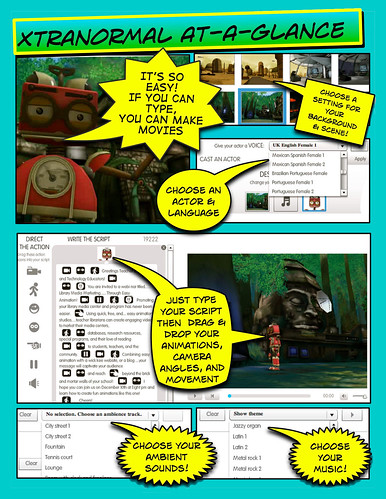
If you can type, you can make movies. Text-to-Movie
Click the Make Movies tab at the top of the page. On the page that appears, chose the style and number of characters you want to use.
The movie maker appears. You can change the set, actors, and background music. Start typing the dialogue for your actors. You can drag many actions directly into the text blocks such as camera angles, sound effects, facial expressions, and character animations.
Down arrowUp arrow
grey line
Pencil (software to download)
http://www.les-stooges.org/pascal/pencil/
Pencil is an animation/drawing software for Mac OS X, Windows, and Linux.
It lets you create traditional hand-drawn animation (cartoon) using both bitmap and vector graphics.
Pencil is free and open source.
Down arrowUp arrow
grey line
aniBoom Create animation online
http://www.aniboom.com/Animachines/
aniBoom Create animation online
ShapeShifter - The Online Animation Application
aniBoom is also an animation network that teams up with the creators community to create,produce and monetize original animations and cartoons on Web, Mobile, TV and Gaming platforms.
Down arrowUp arrow
grey line
Gawker
http://gawker.sourceforge.net/Gawker.html
Gawker is an application for Mac OS X that creates time-lapse movies using a webcam.
Images from your camera can be shared, allowing other users to record your image stream. Streams can also be combined to create a time-lapse movie with up to four locations side-by-side.
Down arrowUp arrow
grey line
SAM Animation : for making stop-action movies
http://www.samanimation.com/
SAM Animation : for making stop-action movies
SAM Animation is a software platform that allows the user to make stop-action movies using a USB or fire-wire real-time (i.e. web camera or webcam) and whatever props the user desires.
The software is both Mac and PC compatible and free to all users willing to register with www.samanimation.com.
Down arrowUp arrow
grey line
Control with Scratch . intro to Y5 and Y6
http://tinyurl.com/5ozq35
Control with Scratch
"Scratch is a programming language that makes it easy to create your own interactive stories, animations, games, music, art, etc and share your creations on the web.
Scratch is designed to help young people (ages 8 and up) develop 21st century learning skills.
As they create Scratch projects, young people learn important mathematical and computational ideas, while also gaining a deeper understanding of the process of design.
It allows schools to deliver the control technology elements of the ICT NC Pos in an exciting and imaginative way leading to the use of Scratch to demonstrate / enhance learning across the curriculum."
Down arrowUp arrow
grey line
Animasher
http://www.animasher.com/
Animasher ... this is a place where you make animations
Down arrowUp arrow
grey line
Slidoo : horizontal photo slideshow for Flick
http://slideoo.com/
Slidoo : horizontal photo slideshow for Flick
Down arrowUp arrow
grey line
Scratch
http://scratch.mit.edu
Scratch is a programming language that makes it easy to create your own interactive stories, animations, games, music, and art -- and share your creations on the web.
Scratch is designed to help young people (ages 8 and up) develop 21st century learning skills.
As they create Scratch projects, young people learn important mathematical and computational ideas, while also gaining a deeper understanding of the process of design.
Down arrowUp arrow
grey line
Apture
http://www.apture.com/
Apture provides the first rich communication platform allowing publishers and bloggers to easily turn flat pages of text into multimedia experiences.
Down arrowUp arrow
grey line
Ed.VoiceThread
http://ed.voicethread.com
Ed.VoiceThread is ...
It's a web-based collaborative network that is simple, powerful and safe. Specifically designed for K-12 educators and students, Ed.VoiceThread enables rich collaboration around multimedia in a secure environment. More like a pencil than a software platform, Ed.VoiceThread is a space for creating digital stories and documentaries, practicing language skills, exploring geography and culture, solving math problems, collaborating with other students, or simply finding and honing student voices.
The Ed.VoiceThread network is a worldwide community where safety is built upon a foundation of accountability. All users are known users, responsible for their content and behavior. Access is restricted to K-12 educators, students and administrators, and all content is created exclusively by registered members of the community.
Down arrowUp arrow
grey line
Download Videos from Websites (e.g.YouTube)
http://keepvid.com/
Download Videos from Websites (e.g.YouTube)
Down arrowUp arrow
grey line
Bombat TV ... how to use it.
http://www.teachertrainingvideos.com/fun/index.html
Screencast Tutorial about Bombay.tv ... a website that allows you to put subtitles and voice over old Bollywood movies.
Down arrowUp arrow
grey line
OneLan
http://www.onelan.co.uk/
The ONELAN Net-Top-Box (NTB) is a cost effective, standalone Digital Signage 'Solution-in-a-box' . Display powerful communications in High Definition using Live TV or Video Feed, RSS, HTML and Flash Content all on one screen.
A small high-speed network appliance with built-in web server allowing users to configure scheduled, zoned multi-media content for a variety of display screens.
Down arrowUp arrow
grey line
Global Kids' Digital Media Initiative
http://holymeatballs.org/
Global Kids' Digital Media Initiative
Down arrowUp arrow
grey line
Quick Capture
http://youtube.com/my_videos_quick_capture
Quick Capture allows you to record a YouTube video instantly via your computer's webcam and it is hosted online immediately.
Down arrowUp arrow
grey line
Scratch
http://scratch.mit.edu/
Scratch is a new programming language that makes it easy to create your own interactive stories, animations, games, music, and art -- and share your creations on the web.
Scratch is designed to enhance the technological fluency of young people, helping them learn to express themselves creatively with new technologies.
As they create Scratch projects, young people learn important mathematical and computational ideas, and they gain a deeper understanding of the process of design.
Scratch is developed by the Lifelong Kindergarten group at the MIT Media Lab, with financial support from the National Science Foundation, Intel Foundation, and MIT Media Lab research consortia.
Down arrowUp arrow
grey line
How To Create Slideshows in PhotoStory 3
http://www.techlearning.com/story/showArticle.php?articleID=196604105
How To Create Slideshows with the Free PhotoStory 3
Like most teachers, you appreciate instructional technology – especially if it’s free. Not only is Photo Story 3 free, but it is also a fun and fabulous way for even the technology newbie to throw together a viewable video in a very short amount of time.
With a few still images, the right music or set of sound clips, and a little creativity, teachers can introduce new concepts or topics in a format that can intrigue students to learn more. This article will introduce Photo Story 3 and illustrate how this free product can be used to integrate technology across the curriculum.
Down arrowUp arrow
grey line
Pivot Stickfigure Animator
http://www.snapfiles.com/get/stickfigure.html
Pivot Stickfigure Animator
Free Software to download.
Pivot Stickfigure Animator is a unique software, that allows you to create stick figure animations easily and without any artistic skills. You can move the sections of the sick figure and easily create a chain of animation frames that can be previewed as you go.
You can use more than one stick-figure in the animation, and even create your own stick figures using an easy to use visual editor that lets you assemble objects out of lines and circles.
Down arrowUp arrow
grey line
Mediascape
http://www.createascape.org.uk/
A mediascape is a digital activity or project enabling you to experience new things in the landscape around you with a handheld computer and pair of headphones.
To create a mediascape, you start with a digital map. Using special software, digital sounds and pictures are attached to specific points on the map.
"a website that provides free resources to enable teachers and pupils to create digitally-enhanced, personalised learning experiences. These are created using HP's Mediascape authoring toolkit and are a collection of location-sensitive sounds and images which are 'attached to' the local landscape, and then experienced using mobile technology."
Down arrowUp arrow
grey line
Revelation Sight and Sound : Examples Gallery
http://www.logo.com/rss/examples.html
Revelation Sight and Sound : multimedia software from Logotron : Examples Gallery
There are four examples here, which are supplied with Revelation Sight & Sound, for classroom project work.
Freda & the Doodlebug : An example of digital story telling in the style of a documentary, which combines original film footage, stills and interviews.
The Rock Pool : This project demonstrates the rostrum camera technique, which creates movement simply using stills. This is an excellent way to tell stories.
The Tiger : Stop frame animation is one of the most popular forms of film making. The Wallace and Grommit films are made using this technique, and it is amazingly easy to do using Revelation Sight & Sound.
Living History : A documentary about people who were 9 – 11 years old during the Second World War. This is a great way to bring 'living history' into the classroom
At first sight Logotron's Revelation Sight and Sound looks like a straightforward video-editing program, but it is much more than that.
This webpage is also an example of how ... if you post a video on YouTube then it can be incorporated in your own webpages.
Down arrowUp arrow
grey line
Clover : a free multimedia authoring tool
http://www.icctp.net/interact.php
Clover : a free multimedia authoring tool produced by The Intercultural Cross Cultural Teaching Portal
We have developed and designed Clover, an authoring tool that engages students and teachers in a technology-rich design process to construct animated narrative vignettes (simulations) that deal with school interactions. The tools leads students through the process of constructing a vignette - writing a narrative, writing a script, sketching characters and scenes, animating scenes, and responding to vignettes created by other students
Because the vignettes are based on real-life experiences and are more compelling than those created with just pencil and paper alone, students will become more vested in the learning process and the vignettes will have greater learning impact.
Down arrowUp arrow
grey line
Digital Video for Teachers
http://www.digitalvideoforteachers.co.uk
Digital Video for Teachers
DV 4 Teachers website provides FREE on line tutorials. Digital Video for Teachers the Book ISBN 1-905415-03-6 has a CD with 60 video byte sized tutorials and clips for the worked examples.
Although there are some free online tutorials most are available by subscription.
Down arrowUp arrow
grey line
VirtualDub : Video Capture Free Software
http://www.virtualdub.org/
VirtualDub : Video Capture Free Software
VirtualDub is a video capture/processing utility for 32-bit Windows platforms (95/98/ME/NT4/2000/XP), licensed under the GNU General Public License (GPL). It lacks the editing power of a general-purpose editor such as Adobe Premiere, but is streamlined for fast linear operations over video. It has batch-processing capabilities for processing large numbers of files and can be extended with third-party video filters. VirtualDub is mainly geared toward processing AVI files, although it can read (not write) MPEG-1 and also handle sets of BMP images.
Down arrowUp arrow
grey line
Clay Animation Kit | VideoBlender | SimplyVR |
http://www.tech4learning.com/products/index.html
Clay Animation Kit | VideoBlender | SimplyVR |
With this kit, a little imagination, a camera, and a computer, your classroom will become an active learning environment. Your students will love using Clay Animation in cross-curricular group projects that incorporate writing and technology skills.
Down arrowUp arrow
grey line
Squeak (free software)
http://www.squeakland.org/
Squeak (free software)
Squeak is a "media authoring tool"-- software that you can download to your computer and then use to create your own media or share and play with others.
Many students are using Squeak to learn more about how the world works. See children's projects and teacher's comments in School Stuff.
Other "Squeakers" use Squeak to develop games and other forms of online entertainment, while still more are writing software and basing companies on this remarkably powerful scripting language.
Multimedia Software FREE
Down arrowUp arrow
grey line
Wow your teachers with stunning school reports
http://www.microsoft.com/windowsxp/using/digitalphotography/photostory/tips/school.mspx
Wow your teachers with visually stunning school reports
Microsoft Encarta, a software encyclopedia for your computer, is an incredible reference for kids, teens, and college students. Encarta has thousands of pictures of everything from aardvarks to Zimbabwe, and you can use these pictures to make your next school report more visually exciting-and impress your teachers while you're at it. Using Encarta with Photo Story 3 for Windows, you can make compelling photo movies-complete with narration and background music. You can even add your own photos.
Watch sample report about Quebec City for inspiration, and then go make your own!
Down arrowUp arrow
grey line
Creativity in Digital Media Awards 2006 (UK)
http://www.becta.org.uk/corporate/display.cfm?section=21&id=2663
Creativity in Digital Media Awards 2006 (UK)
The Creativity in Digital Media Awards is an awards scheme for all students aged between 5 and 18 across the UK. The Awards aim to inspire practitioners and students to demonstrate and celebrate creativity in the use of digital video, digital still images and digital music. The Awards will identify and exemplify effective practice which can then be disseminated as advice to the wider learning and teaching community.
The usefulness of this website is that it contains an archive of previous winners.
Down arrowUp arrow
grey line
Microsoft : Photo Story 3
http://tinyurl.com/dzhhr
Microsoft : Photo Story 3
Connect with your friends and family in a whole new way
Now it's easier than ever to share your photo stories with family and friends. When you save a story, Photo Story 3 compresses your digital photos into a single small file that automatically preserves the great picture quality. E-mail it to family and friends. Then watch it on a computer, TV, or portable device?ithout the hassle of large file sizes.
Photo Story 3 includes Rostrum camera motion
Down arrowUp arrow
grey line
Onion skin : online animation application.
http://grant.robinson.name/projects/onion_skin/
Onion skin : online animation application.
Works well at all ages ... a bit like the stick animated cartoon drawn in the corners of a book ... which is animated by flipping the pages ... but done online.
Down arrowUp arrow
grey line
Multimedia Design: Cool Kid Projects
http://www.techlearning.com/content/epubs/dmc/
Multimedia Design: Cool Kid Projects
This new e-resource represents a collaborative effort between Technology & Learning and DV magazines. In it, you'll find a range of expert buying tips, best practices, stats and more to help you integrate digital media into teaching and learning.
Down arrowUp arrow
grey line
Digital Blue : Digital Camcorder
http://www.playdigitalblue.com/home
Digital Blue : Digital Camcorder
Prime Entertainment's Digital Blue?products are designed for fun and entertainment at home or interactive classroom learning.
Cost about GBP 85
Down arrowUp arrow
grey line
iMovie Tutorials
http://www.apple.com/support/imovie/
iMovie Tutorials
Through the use of easy-to-follow movies, step-by-step instructions, and helpful tips, our tutorials are a great way to get started with iMovie.
Down arrowUp arrow
grey line
Animation and Multimedia Online Tutorials
http://www.kidzonline.org/TechTraining/
Online Streaming Video Tutorials on Animation and Multimedia
2D Animation | Media Translation | 3D Animation | Net Basics | Digital Audio | Online Collaboration | Digital Imaging | Security and Ethics | Digital Video | Utilizing the Internet | Microsoft PowerPoint |
Down arrowUp arrow
grey line
Kids' Vid
http://kidsvid.hprtec.org/index.html
Kids' Vid is an instructional web site that gives teachers and students the tools necessary to implement video production in the classroom. Video production can be intimidating to the novice. Not to worry. It is nothing more than a method for recording research and expressing creative ideas. Video production, if properly implemented, is more than a new toy for students.
It provides the tools and the means for students to create and display serious work in a new, exciting and engaging way that is appropriate for all age groups and abilities.
Down arrowUp arrow
grey line
Make Your Own Movie Online : DigitalFilms
http://www.digitalfilms.com/
Make Your Own Movie Online
Unleash your creativity and make your digital film for free! Choose a background scene, characters, animated actions, dialog, introduction, and ending credits. Put your name as the producer and email the movie to your friends! You can also signup for free as a registered user, which gives you access to more advanced features, such as being able to save or edit the movies that you create.
Down arrowUp arrow
grey line
The Conference Recorder
http://www.virtualdesk.net/
The Conference Recorder
This screen capture software allows you to record video conferencing video to AVI (Video for windows). In addition, this program can also record web cams to AVI. It is compatible with Cuseeme, Netmeeting, VDOphone, IcuII, Internetphone, and many others.
Down arrowUp arrow
grey line
Animation Inspirations
http://www.apple.com/uk/education/animation/
Animation Inspirations
Creative educators are constantly looking for new ways to engage and inspire pupils through multimedia, as well as new ways to present information to students who are becoming increasingly digitally literate. Stop motion animation offers a simple yet effective solution.
Also known as claymation or stop frame animation, stop motion animation encourages language, mathematical, logical, spatial, collaborative and creativity skills.
Stop motion animation is a unique cross-curricular classroom activity that challenges the creative talents of students of all ages.
What Is Stop Motion Animation? | What You Will Need | Typical Timeframe | Curriculum Areas Covered | Outcome | examples | Animation for Education |
Download a seven-day demo of iStopMotion to get a feel for how it works without having to buy the full version.
Down arrowUp arrow
grey line
Anim8ed (Film Animation )
http://www.anim8ed.org.uk/resources.asp
Anim8ed | Animation Techniques | The NMPFT Animation Gallery | Animation Index |
Down arrowUp arrow
grey line
Generation M: Media in the Lives of 8-18 Year-olds
http://www.kff.org/entmedia/entmedia030905pkg.cfm
Generation M: Media in the Lives of 8-18 Year-olds
Generation M: Media in the Lives of 8-18 Year-olds, examined media use among a USA nationally representative sample of more than 2,000 3rd through 12th graders who completed detailed questionnaires, including nearly 700 self-selected participants who also maintained seven-day media diaries.
Down arrowUp arrow
grey line
Using a digital video camera
http://tre.ngfl.gov.uk/server.php?request=cmVzb3VyY2UuZnVsbHZpZXc%3D&resourceId=11458
Using a digital video camera
A video in several clips that shows how to use a digital video camera. As a starter activity it can be shown to groups of students before they use a digital video camera for the first time.
The video is also a good example of an animation. It can be used to demonstrate the importance of having a single idea that holds the video together.
Also it can be used to demonstrate how to create an animation, with the character as narrator. How to use background music and voice -over.
Down arrowUp arrow
grey line
How To Embed Video in Classroom Presentations
http://techlearning.com/story/showArticle.jhtml?articleID=17701372
How To Embed Video in Classroom Presentations
Definition: Embedding is a means of physically inserting a video clip into an application so that it plays within the presentation.
Many educators are using the multimedia controls within some of their regular applications such as Microsoft PowerPoint and AppleWorks. You can too. Here's how.
Down arrowUp arrow
grey line
Video Book Maker (free to download from MAPE)
http://www.mape.org.uk/activities/index.htm
Video Book Maker (free to download from MAPE)
Make the most of your digital video by creating a book which uses video clips instead of still images. Windows Media Player, Real Video and QuickTime are supported.
Down arrowUp arrow
grey line
Make Movies web site
http://www.makemovies.co.uk/
Animation Lessons | Animation Scriptwriting (Creating characters and stories) | Curriculum Animation (Techniques, equipment and materials) | Computers for Animation (Scanners, digital cameras etc.) | bouncing ball | roller | Animation workshop material | recommended for schools
Down arrowUp arrow
grey line
Digital video in the classroom
http://www.ictadvice.org.uk/index.php?section=tl&catcode=as_cu_sec_sub_14&rid=6629
How to organise the use of digital video in the classroom
You can use digital video (DV) assets to enhance teaching in a range of contexts. This section explains some strategies you can employ.
Demonstration | Modelling | Explaining | Questioning | Intervening | Providing feedback | Project planning | Resource management | Equipment | Software | Managing pupil work | Active DV projects | Finished DV projects |
Down arrowUp arrow
grey line
Evaluation versions of Xipster for PC or Mac
http://www.xipster.com/download/downloadXipster.htm
Evaluation versions of Xipster for PC or Mac
Discover the first easy-to-use stop-motion creativity software that comes complete with sound effects and soundtracks! You can even record your own voice right into XIPSTER all in one application. Using XIPSTER, you can turn images captured by your webcam or digital camera into incredible special effects movies, amazing animations or even outrageous school reports and projects. What's more, XIPSTER gives you the power to share your movie. With the click of a button, your projects turn into QuickTime movies that you can email or IM to your friends!
In addition to being a fun and easy creative tool, XIPSTER also serves as a valuable instructional resource. For example, XIPSTER can help students to realize book reports, history lessons and science projects in an engaging and exciting manner while simultaneously promoting visual literacy and higher-level thinking skills.
Down arrowUp arrow
grey line
Creativity in the classroom using digital media (Win/Mac)
http://www.dvtraining.org.uk/
Creativity in the classroom using digital media (Win/Mac)
This course has been arranged in association with the TES and will show ways teachers and pupils can use digital media creatively in education.
The course will show you how to get more out of the programs available on the May 14th issue of the TES CD ROM such as iTunes TM. The course will give access to free resources for use in the classroom. Access is free to this course and you can recieve free accreditation for the course if you register before the end on July 04.
Down arrowUp arrow
grey line
Centre for Digital and Interactive Audio
http://www.cendia.co.uk/
Cendia - The Centre for Digital and Interactive Audio, based at Bath Spa University College, has strong links with national and global companies in the field of music and audio technology.
The Music Key - is a joint venture with Sound Technology plc in collaboration with Emagic GmbH and Apple Computer Inc. and represents a new concept in integrated music education.
The courseware itself runs alongside Emagic's Logic software offering the user a multimedia interface that allows them to browse tuition movies, text files, etc. whilst creating music. It is supported by schemes of work, lesson plans, hard and soft resources and provides the music educator with a total resource for delivering music education all aligned to national curriculum attainment targets and relevant syllabi. The Music Key provides teachers from Junior level through to A level and National Diploma with an integrated and progressive scheme for teaching music and music technology with all resource materials required.
Down arrowUp arrow
grey line
..click for more links on this subject => more websites


use this box to search more on Shambles or on the Web : (powered by Google) : safe filtering is ON
Google  
Web Shambles Website
Use this form to submit links to add to the list above (the webmaster will check the link before publication)
 Heading:
 Address:
 Please copy
 Security Code:
    
 Description:
grey line
webkeeper: Chris Smith csmith@csmith.info Shambles RSS Feed :
(50 entries) | Click here to report broken links or problems |
grey line

webpage with others

click to go to Second Life ... Virtual World

Web 2.0 in Teaching and Learning on the Shambles website

The Shambles 'Forest of Theme Blogs'

Podcasts and Podcasting on Shambles

Shambles newsletter

Workshops offered by Chris Smith

Chris Smith's Personal Learning Network

Second Life ... 3D online virtual world

International Schools Island in Second Life

© copyright
The Education Project Asia


Follow me on Twitter : Shamblesguru


| Shambles Home | Brunei Schools : bn | Burma/Myanmar Schools : mm | Cambodia Schools : kh | China Schools : cn | Hong Kong Schools : hk | India Schools : in | Indonesia Schools : id | Japan Schools : jp | Laos Schools : la | Macau Schools : mo | Malaysia Schools : my | Philippines Schools : ph | Singapore Schools : sg | South Korea Schools : kr | Taiwan Schools : tw | Thailand Schools : th | Vietnam Schools : vn | email webmaster (Chris Smith) |

Pause
Resume